

Track access by keeping one list of people and recording, against each person, what they can open at each site and why it was granted. Keys, cards and contractor passes go on the same record. Once access lives with the person instead of with each site, building access management stops being a phone round and becomes a lookup.
What is the challenge of multi-site building access management?
Building access management is hard because each site keeps its own list. One site runs a card system, a key cabinet and a spreadsheet, while another site relies on the facilities manager’s memory. Nobody holds the joined-up picture, so a simple question about one person takes days of calls.
A contractor finishes a job and nobody remembers to chase the key return. A manager moves to another region and keeps the keys from the old one. An incident needs an answer by the afternoon, and the answer depends on whoever remembers.
What should a multi-site access report show?
A useful access report shows, for each person, the site, what they can open there, how they open it, why the access was granted and since when. Without the reason and the date, a report shows what exists but not whether it should still exist.
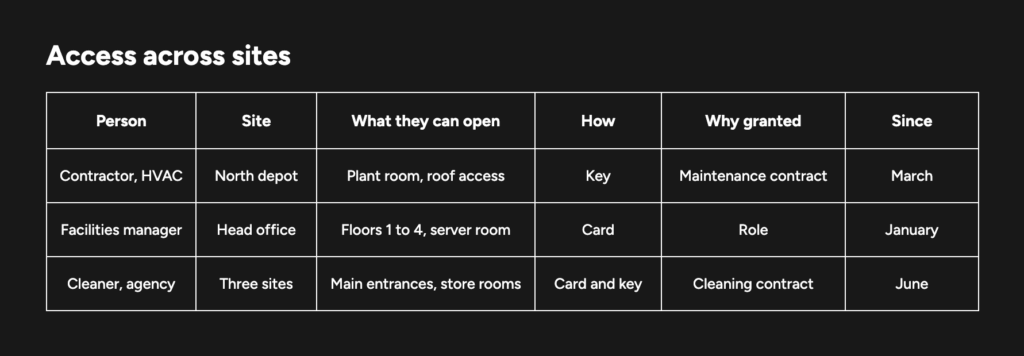
Should access grants be reported by person or by role?
Report access by both person and role. By person when someone leaves, changes job or is involved in an incident, because the question is what that one person can still open. By role when checking the pattern, because the question is whether everyone in a role holds what the role needs and nothing more.
A question like “which contractors can open plant rooms at any of our sites?” cannot be answered one person at a time. It needs access grouped by role, across all sites.
How does a cross-site access view benefit mechanical key management?
A mechanical master key can open many doors and, unlike a card, leaves no record when it is used. A key register of who holds which key at which site, and what that key opens, adds the keys a card-only report leaves out. The same applies to keys across a property portfolio.
How can I see who has access across all my sites in one view?
To track access across sites, start with people rather than doors. List the sites, collect each site’s access list, match every entry to one list of people, record why each grant exists, then review on a schedule. The first pass uses the records each site already holds.
- List the sites and what controls entry at each. Card system, master key system, key cabinet, or a mix. Note who holds the records at each site.
- Collect each site’s access list as it stands today. Card holders, issued keys, contractor passes. Expect gaps, and write them down rather than guessing.
- Match every entry to one list of people. Staff, contractors, agency workers and visitors with standing access. Merge two spellings of the same person into one entry, and check them against a staff or contractor number, not the name alone.
- Record why each grant exists. A role, a contract, a project or a one-off request. Access with no reason attached is the first thing to review.
- Review on a schedule, and remove what is no longer needed. Higher-risk areas get shorter intervals. Each removal is recorded with a date.
Once every grant has a reason, the review in step 5 comes down to checking whether that reason still holds.
Why record the reason for granting access, not just the holder?
Recording why access was granted makes it safe to remove later. A list of who can open what shows the current state. The reason shows whether that state is still right. When a contract ends or a project closes, every grant tied to it is due for removal, and each one can be found.
This matters most for temporary access. A contractor given a key “for the week” can still have it months later, because nothing linked the key to the job. Recording the reason at the time of issue is what makes temporary access that should no longer exist findable.
How do you prove past access to an auditor?
Past access is proven by the history of grants and removals, not by today’s list alone. An auditor asks who could open a door on a date in the past and whether access was removed when it should have been. Today’s list cannot answer either question. A record of each change, with a date, can.
Two frameworks point the same way. In the United States, NIST SP 800-53 control PE-2 asks organisations to keep a list of individuals with authorised access to the facility where a system resides, review it at a set frequency, and remove individuals when access is no longer required.
In Australia, the Information Security Manual from the Australian Signals Directorate states in control ISM-1074 that keys or equivalent access mechanisms to server rooms, communications rooms and security containers are appropriately controlled. Showing that either control is met takes an audit trail of who held access, and when.
The same history answers offboarding. When someone leaves, the record shows what they held at each site and whether each item came back, as described in physical access offboarding aligned to the HR exit.
Common questions about how to see who has access to which buildings across all sites
Do we need one access control system across every site?
No. Many multi-site organisations run different access control systems and master key systems at different sites, often for good reasons. What matters is one record of people and their access. portierX does not replace the locks, cylinders and readers already in place.
How often should access across sites be reviewed?
Set the frequency by risk. Areas such as server rooms, plant rooms and pharmacies justify more frequent reviews than general office floors. What matters most is that the review happens on a schedule, and that each removal is recorded with a date.
portier works in physical access management. That means keys, locking plans and the systems that open doors.
portierX is invite-only ahead of launch. It does not replace the locks, cylinders and readers already in place. Ask us for an invitation.
 English (Australia)
  Deutsch
  Français
  Nederlands